OwnVoice Meet

Understand the meeting. Answer in your own voice.

For meetings, talks and Q&A in English you read better than you speak. What others say appears as live captions with the meaning in Chinese; what you type in Chinese becomes short, natural English that you read aloud yourself. Free and open source.

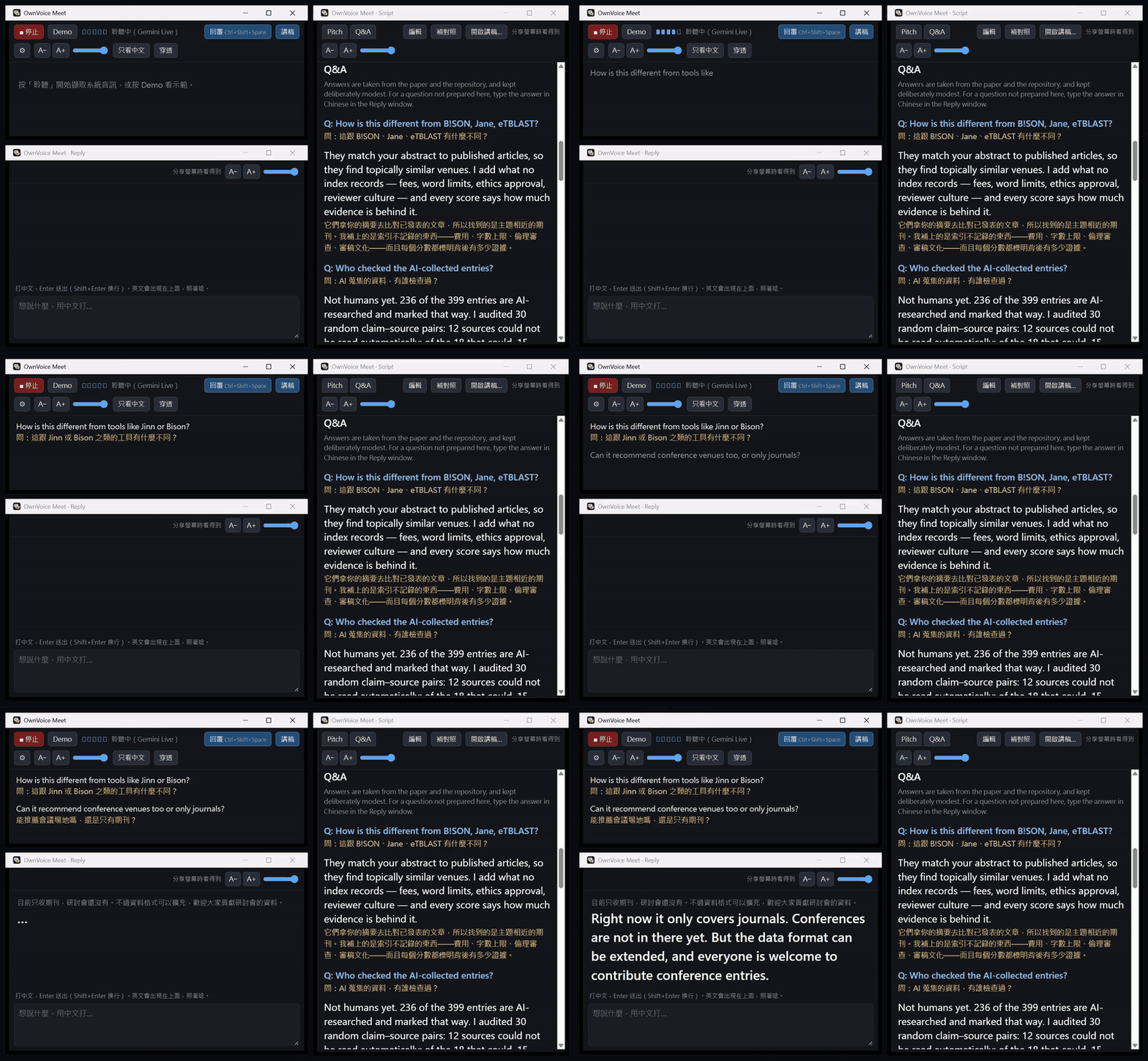
A spoken question becomes captions with Chinese; a prepared answer is open in the script; a reply typed in Chinese becomes English to read aloud.
Recorded with the real pipeline (Gemini Live listening, Claude Haiku 5.5 translating) and the author's JCDL 2026 script. The questions are text-to-speech.

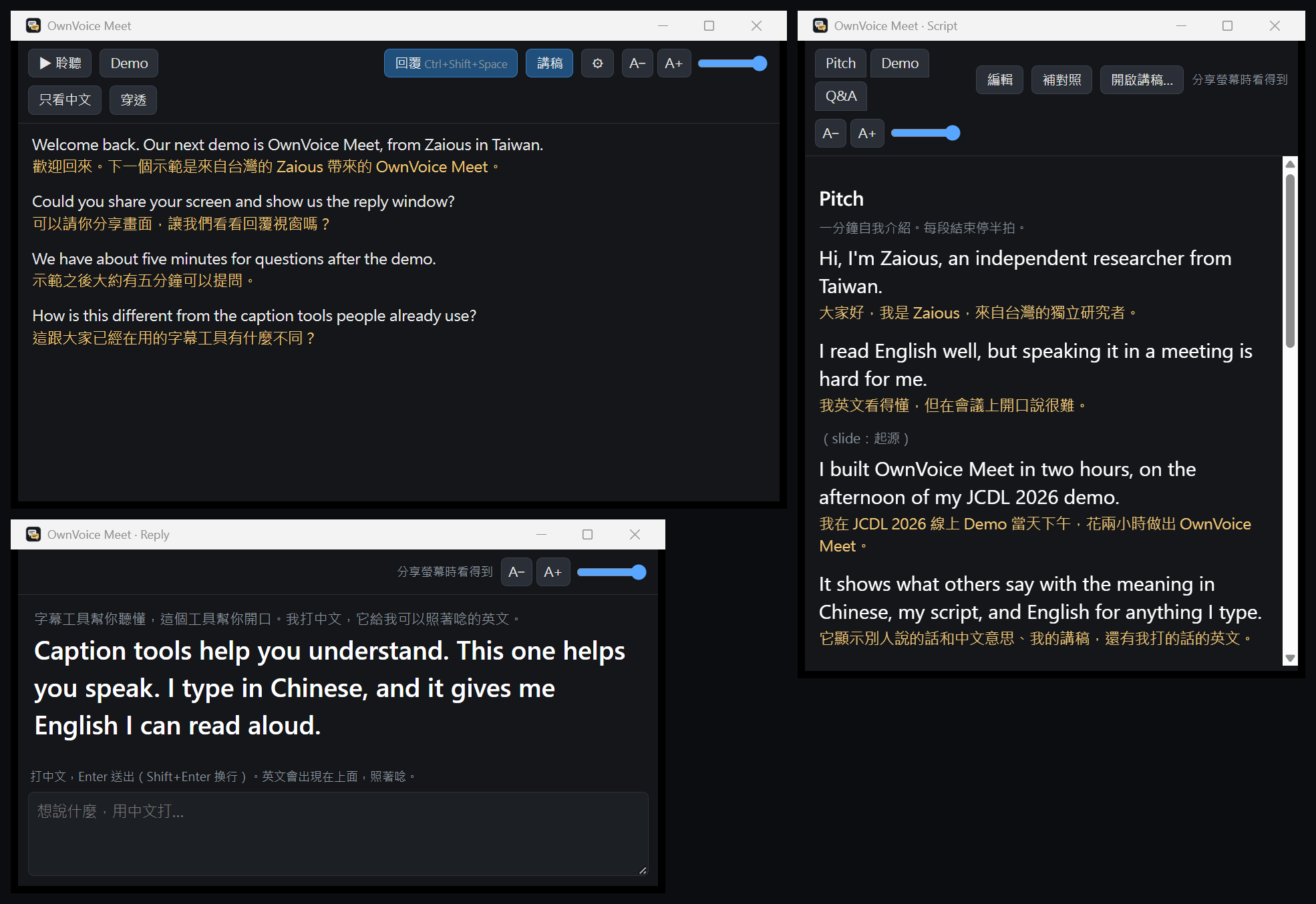
Three windows; open the ones you need.

Reply
Type in Chinese, press Enter, and read the English aloud in large type. It knows what was just said and what is in your script, so names and terms come out right. Ctrl+Shift+Space brings it up while Zoom or Teams has focus.
Captions
What others say, in English as they speak, with the meaning in Chinese under each sentence. Long sentences are translated before they end.
Script
Your talk, prepared answers and notes, bilingual, in tabs. Write either language; one button fills in the other.
The three windows side by side: captions with Chinese, English to read aloud, and a bilingual script.

At the conference venue, too.

Online, it listens to your computer's audio; in the room, it listens through a microphone. Listening, translating, recording and saving on one laptop.

Your words, your voice.

It does not answer for you. There are no AI-written replies and no synthetic voice. You decide what to say and you say it; OwnVoice Meet turns your meaning into English that is easy to say: sentences of about 15 words at most, plain words, your tone and your stance.

Many tools do the listening half. OwnVoice Meet is about the moment you have to speak, and about the script and answers you prepared.

From a few cents an hour.

Bring your own API keys and pay the providers directly; the app is free.

ListeningTranslation and repliesPer hour
Windows Live Captions (free, on the device)Claude Haiku 5.5 or gpt-6-lunaUS$0.03
A Whisper server of your own (free)SameUS$0.03
OpenAI gpt-4o-mini-transcribeSameUS$0.21
Gemini 3.5 Transcribe Live (the smoothest live captions)SameUS$0.57

For example: translation for the author's session at JCDL 2026, an evening of an hour and a half and a bit, cost US$0.11 on Claude Haiku 5.5. These are list-price estimates; your provider's bill is the authority, and Settings keeps track of your own usage.

Download

Windows 10 and 11. A Mac version is planned.

The installer installs for your user only, without administrator rights, and updates itself from Settings. If your work computer will not install programs, use the portable zip: unzip it and run OwnVoice Meet.exe.

The builds are not code-signed yet, so Windows may say "Windows protected your PC": choose More info, then Run anyway. It needs the WebView2 Runtime, which Windows 11 includes. Press Demo first to see all three windows without keys. The interface is in Traditional Chinese for now.

Questions

Not here? Ask on GitHub.

Does it cost anything?

The app is free and open source (Apache License 2.0). Speech recognition and translation run on your own API keys, paid directly to Google, OpenAI or Anthropic: the cheapest combination is about US$0.03 an hour, cloud live captions with translation about US$0.57 an hour. Windows Live Captions or a Whisper server of your own recognize speech for free.

Does it answer for me?

No. There are no AI-written replies and no synthetic voice. You type what you mean in Chinese; it only turns that meaning into English that is easy to say, and you say it yourself.

What do I need?

Windows 10 or 11, and API keys for the services you pick (Gemini and Anthropic, for example). Settings links to each provider's key page. Keys are kept in Windows Credential Manager, never in a file.

Where do recordings and transcripts go? Are they uploaded?

Saving is off by default. Turned on, recordings and transcripts stay on your computer (by default in an OwnVoice Meet folder in Documents) and never reach the author; the speech service you pick does hear the audio. Check the organizer's rules before recording a talk.

My work computer will not let me install programs.

Use the portable zip: unzip it and run OwnVoice Meet.exe, no administrator rights needed. It cannot help if company policy blocks downloaded programs or desktop apps' access to the microphone.

Is there a Mac version?

Not yet. Windows only for now; a Mac version is planned.

Why does Windows say it protected my PC?

The app is not code-signed yet; that does not mean anything is wrong. Choose More info, then Run anyway. The source is public on GitHub, and GitHub builds the installers from it.

How does it update?

Installed copy: Settings, Check for updates, Update; the update's signature is checked before it installs. For the portable zip, download the new one. The app contacts GitHub only when you press Check for updates.

Made for one conference.

The author, an independent researcher from Taiwan, reads English well but often cannot find the words in time in a meeting. In October 2026 the author had an online demo at JCDL 2026, the ACM/IEEE Joint Conference on Digital Libraries, built a first version that afternoon in about two hours, and kept it open through the whole session: captions with Chinese while others spoke, a bilingual script and prepared answers beside them, and typed Chinese turned into English for anything not prepared.

Many people asked for it afterwards. OwnVoice Meet is that tool rebuilt to be shared: no graphics card needed, and your choice of providers.

Your accounts, your computer.

Meeting audio goes only to the speech service you choose and text only to the language model you choose, on your own keys; the author has no server and receives nothing. The app has no analytics and contacts GitHub only when you press Check for updates. With Windows Live Captions or your own Whisper server, the audio never leaves your computer.
Gemini's free tier uses your data to improve Google's products; use a paid-tier key. Some meetings are confidential, and some places require everyone's consent before a conversation is transcribed: check before you turn it on.